
nextrmnl
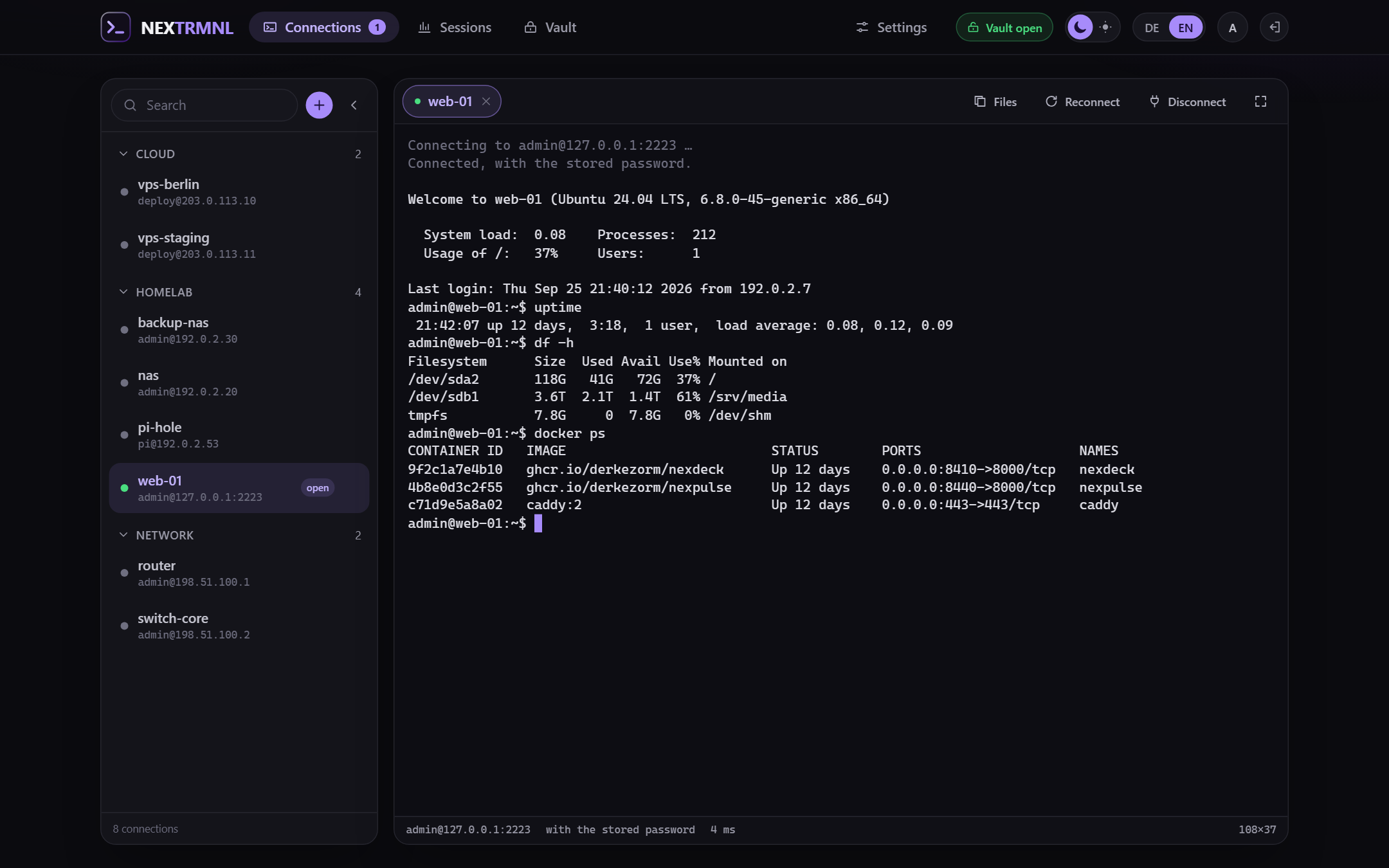
SSH and SFTP in the browser, on your own server. A terminal with tabs, the files next to it, and a vault per account for keys and passwords. One container, one file. No account with us, no price, no subscription.
SSH and SFTP in the browser, on your own server. A terminal with tabs, the files next to it, and a vault per account for keys and passwords. One container, one file. No account with us, no price, no subscription.
Free, open source under AGPL-3.0, self-hosted, one Docker container
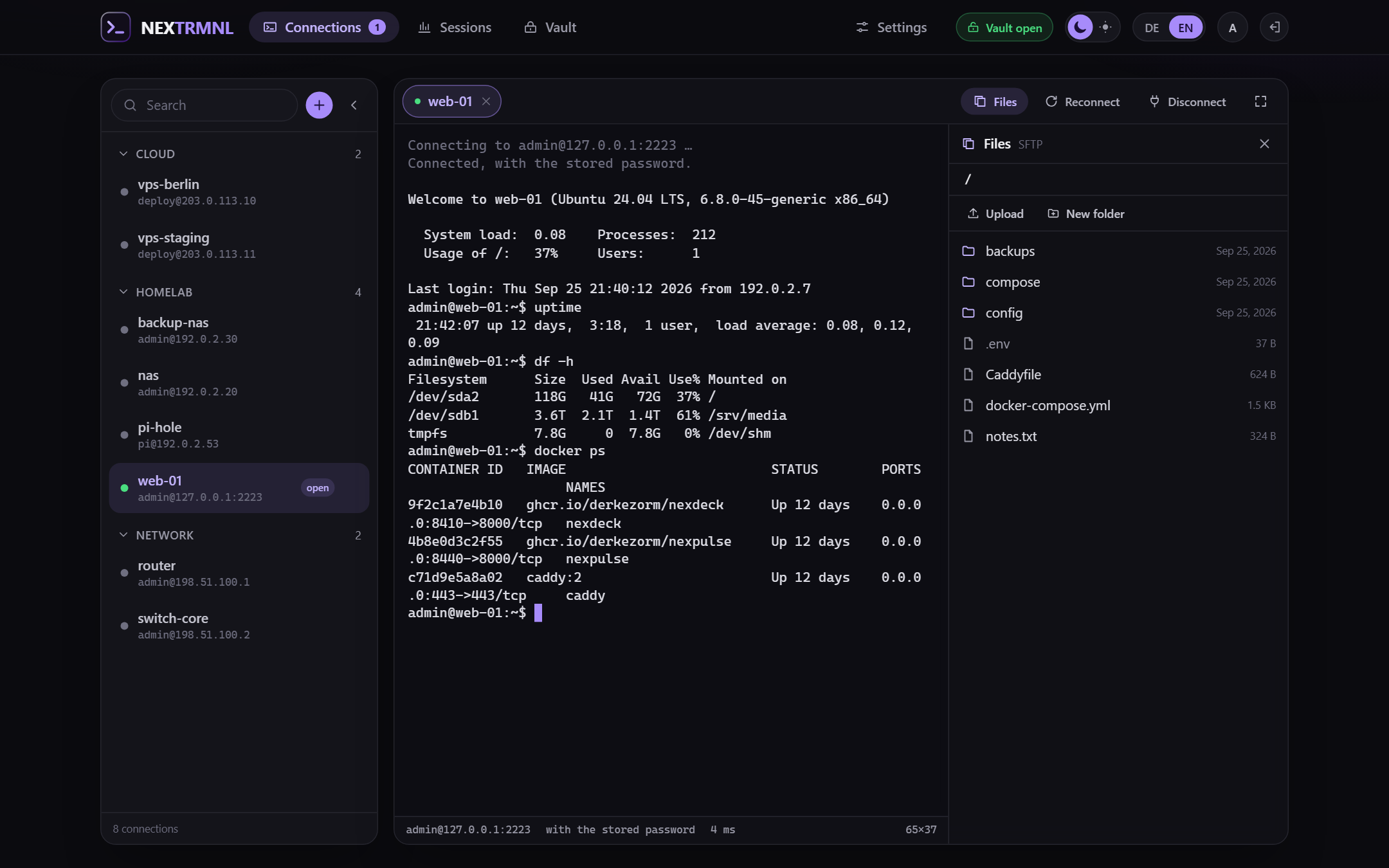
One click on “Files”, and the machine's folder stands next to the shell: upload by drag and drop, download, rename, create, delete. Over the same SSH connection, without a second program and without a second password.
Have a look
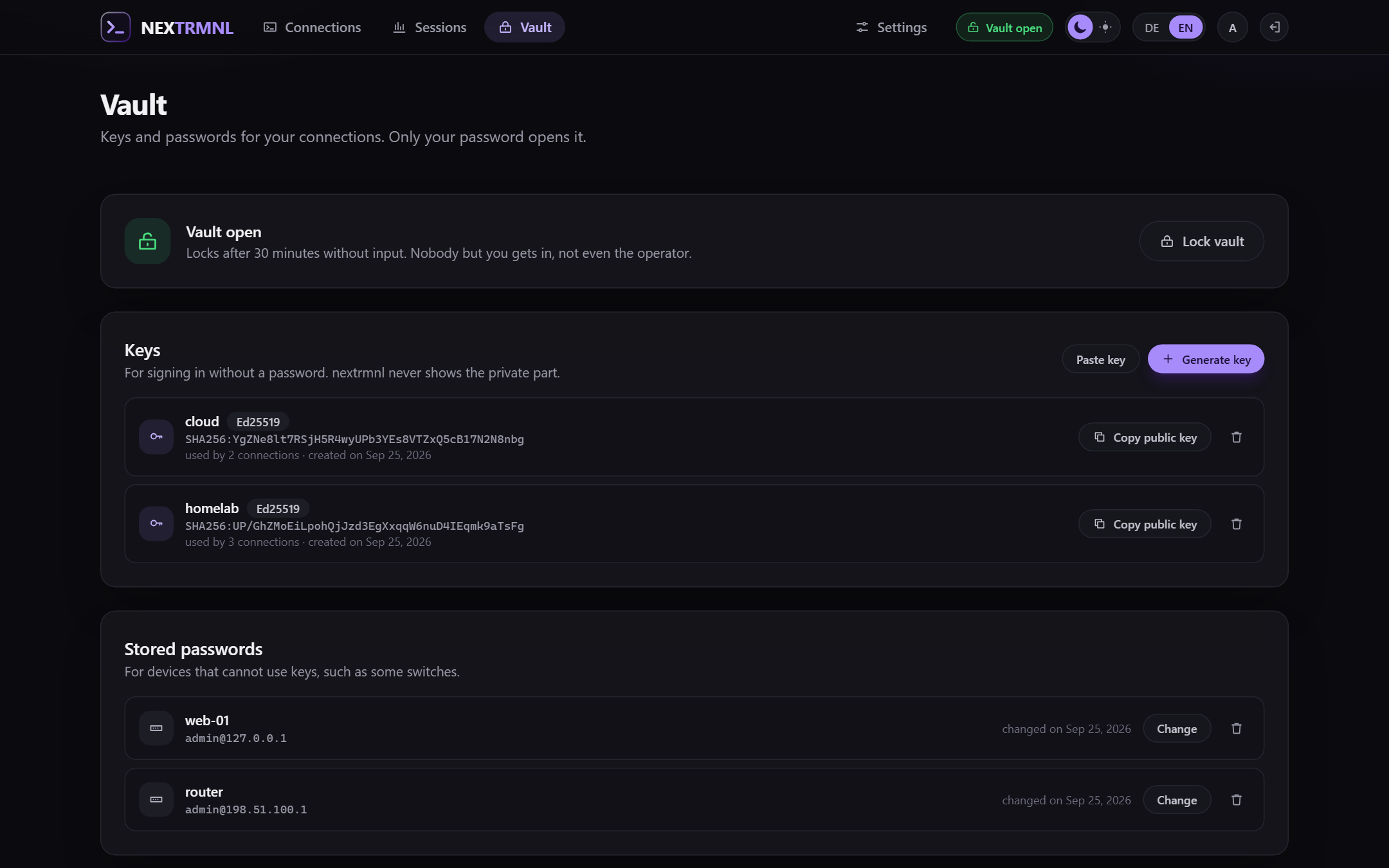
Every account has a vault, sealed with the account's password. You generate keys in it or paste them, and it remembers passwords for devices without keys. The operator sees none of it, and neither does a backup.
Have a look
nextrmnl
SSH and SFTP in the browser, on your own server. A terminal with tabs, the files next to it, and a vault per account for keys and passwords.
Your credentials live in a vault that only your password opens. Not the operator, not a backup, not a copy of the database can read them.
One container, one SQLite file. No second service, no database credentials, and a backup is one encrypted file.
PuTTY and WinSCP run on the machine they are installed on. From the laptop in the living room, from a tablet or from the machine at work you cannot reach your servers.
There are a few web terminals. Most store keys and passwords in a way the server can read, and with it anyone who gets hold of the database or a backup.
A homelab is rarely for one person. So: accounts. Everyone sees their own connections, shares addresses, never access, and the operator sets the limits towards the outside.
Anyone who can use PuTTY finds their way at once: click a connection, terminal, done. The connection list floats above the terminal and closes after the choice; whoever prefers to keep it in view pins it to the left. Several sessions sit side by side as tabs, and one button switches to full screen.
xterm.js in the browser; behind it the nextrmnl server speaks SSH to your machines. Tabs for open sessions, jump hosts, a command to run after connecting (say tmux), keepalives, full screen at the press of a button.
SFTP over the same SSH connection: browse folders, upload by drag and drop with progress, download, rename, create folders, delete; a folder with contents only after a confirmation. No second program, no second password, no second way through the firewall.
Selecting copies. Ctrl+Shift+C, Ctrl+Insert and Ctrl+C with a selection copy; Ctrl+V, Ctrl+Shift+V, Shift+Insert and a right click paste. Several lines are shown by nextrmnl before they run.
Generate Ed25519 or RSA keys or paste existing ones, with a passphrase too. Passwords for devices that cannot take a key. The vault is sealed with your account's password and can be downloaded as an encrypted file and restored elsewhere.
Before every sign-in the machine's key is compared. An unknown one shows its fingerprint before you type anything; a changed one is refused until the operator accepts it. Nothing is trusted on its own.
By default nextrmnl only connects into private networks: 10.x, 172.16 to 172.31, 192.168.x, 100.64.x for VPNs. The operator adds further networks and names or opens it up entirely. A connection goes to the address that was checked, not to a second resolution of the name.
The first account is the operator, the others come by invitation link. A connection can be shared: the others see name, address and settings and sign in with their own user, key or password. Access never travels along.
A password of at least twelve characters, plus a second factor from the authenticator app if you want one. Or OpenID Connect: Keycloak, Authelia, Pocket ID and anything else that follows the standard. For authentik one button sets up provider, application, signing key and mapping by itself.
Copies on a schedule and before every schema change, through SQLite's backup interface rather than as a file copy. The download is an AES encrypted ZIP that 7-Zip opens without nextrmnl. Restoring shows what is inside first and restarts afterwards.
Four levels; the deep ones switch themselves off after a while. Every line carries a request id, which also appears in the error message in the browser. Terminal content, keystrokes, passwords, keys and tokens never appear in it; a test scans the code for them.
Both, switchable at the top right, plus light and dark. A third language is one JSON file and one entry in a list; a test checks that no language falls behind.
nextrmnl holds the access to all your machines. In every decision the secure side therefore wins, even when it is less convenient. Here is what that means, so you know beforehand.
Argon2id derives a key from your password, and that key wraps the vault key; the entries are encrypted with AES-256-GCM. An open vault is nothing but its key in the server's memory, and that is forgotten after the idle time and on every restart. Backups contain the vault as sealed as it is.
A code from the authenticator app on top of the password, with eight recovery codes for the day the phone is gone. With a second factor the password alone opens nothing: the vault key waits in memory for the code, at most five minutes and five tries. The operator can require the second factor for every password account.
Ten wrong passwords or codes in a row lock the account for a quarter of an hour, wherever they come from. That also applies to every password prompt while signed in, for instance before exporting the vault. Terminals end with the sign-in they belong to.
Who gets in is your decision, one person at a time. There is no open registration.
You create a link that is good for seven days and for one account. Whoever opens it chooses name and password themselves; nobody types in someone else's password.
A password, with a second factor if you like, or sign-in through your provider. An existing account links itself to its identity there; new accounts through the provider only exist if you allow it.
Every account has its own connections and its own vault. A share passes address and settings; the member signs in with their user, their key or password, and only their own start command runs in their shell.
The operator sees who is connected where right now, can end a session, sign an account out everywhere or reset its second factor. What was typed they never see.
Setting up an OIDC provider is always the same dozen forms. For authentik nextrmnl does it for you: address and a one-time API token, and it creates signing key, the mapping for the verified email address, provider and application itself. It needs the token once and does not store it. Whoever prefers to work without a token downloads a blueprint.
Then open http://<server>:8460 in the browser and create the operator account. The password is at least twelve characters; it also seals the vault.
services:
  nextrmnl:
    image: ghcr.io/derkezorm/nextrmnl:latest
    container_name: nextrmnl
    restart: unless-stopped
    ports:
      - "8460:8000"
    volumes:
      - ./data:/data
    environment:
      PUID: 1000
      PGID: 1000
      TZ: Europe/Berlin
The complete file with every switch and a reason for each is in the repository.
/data belongs on a local disk, never on an SMB or NFS share. That is the one way SQLite really loses data: its locking does not work reliably over network drives. On a NAS you take a path on the internal disk.
/data| File | What is in it |
|---|---|
nextrmnl.db | Accounts, connections, shares, host keys, settings and the sealed vaults |
secret.key | The key to the server-side secrets: the OIDC client secret and the seeds of the second factor |
backups/ | The backups on a schedule and before schema changes |
logs/ | The log, without terminal content or credentials |
secret.key. They open only with the password of the respective account, in a backup too. Under Settings, Backups nextrmnl writes you an encrypted archive with database and key; whoever finds it still has not a single credential.
nextrmnl belongs behind TLS before you use it from anywhere but your own desk. It holds the access to your machines, and pasting with a right click only works over HTTPS anyway. The address people use to reach nextrmnl goes under Settings, Sign-in; it appears in invitation links and is the return address at the OIDC provider. NEXTRMNL_TRUSTED_PROXIES names the proxy so the sign-in brake sees the real senders.
This describes version 0.2.0. nextrmnl connects, transfers files, keeps keys and passwords in the vault, checks host keys, knows accounts and shares, backs itself up; more than 190 tests watch over that, some of them against a real SSH server. It is young all the same. Try it first on a machine where trouble would not matter.
No RDP, no VNC, no Telnet, no serial console. For the screens of other machines there is Guacamole; nextrmnl is the shell and the files.
Sessions are not recorded, neither the screen nor the keys. The log says who connected where and when, nothing more. That is deliberate and stays that way.
A forgotten password means a new, empty vault. What was inside nobody can bring back, not even the operator. So back the vault up as a file.
There is no account with us and no server of ours. Whoever does not run one of their own cannot do anything with nextrmnl.
Nothing. The source is under the AGPL-3.0, and you run it yourself. There is no paid edition and no feature behind a price.
No. Every account's vault is sealed with that account's password. Neither the operator nor a backup nor a copy of the database can read it. What the operator does see: which accounts exist, who connected where and when, and the names and addresses of shared connections.
The vault is lost then; that is the price for nobody else being able to read it. The account stays, keys and passwords go in again. Under Vault the contents can be downloaded at any time as an encrypted file and restored later, here or on another nextrmnl.
Any machine with an SSH server: Linux, BSD, a NAS, a switch or router. For devices that do not accept a key, the vault remembers the password. SFTP needs an SFTP server on the far side; on a Synology it is switched on separately.
Yes. A single Docker container, on the Synology in Container Manager as a project from the compose file, otherwise anywhere Docker runs. Mind the path for /data: it belongs on the internal disk, not on a network share.
Yes. You invite one person at a time, every account has its own connections and its own vault. A connection can be shared; that passes name, address and settings, never access. The member signs in with their own user and key.
Yes: a code from an authenticator app such as Aegis, 2FAS or Google Authenticator on top of the password, with eight recovery codes. The operator can require it for every password account; whoever locks themselves out gets it reset by the operator.
Because here it is an advantage, not a compromise: no second container, no database credentials, and a backup is one file. The database holds accounts and connections; the load is in the SSH sessions, not in queries.
Both, switchable at the top right. A third language would be one file and one entry in a list, nothing else.